 App Guides & Trends
Hinge Convo Starters: Turn AI Tips Into Better Openers
Learn how Hinge Convo Starters work, turn AI suggestions into natural first messages, improve the profile cues behind them, and manage privacy.
In this article10 sections
Hinge can now show AI-generated ideas for starting a conversation. That sounds convenient, but the feature does not write the message for you. It gives you a direction such as “ask about the restaurant” or “share your favorite dish,” then leaves the actual opener in your hands.
That distinction matters. A suggestion can point at the right detail and still produce a forgettable message if you copy the idea without adding your own voice.
The best way to use Hinge Convo Starters is as a bridge: take the useful observation, add a specific reaction, and finish with an easy question. This guide shows how to do that, what profile content can trigger better ideas, and what to know before opting in.
What Hinge Convo Starters Actually Do
According to Hinge's official Convo Starters guide, the feature may appear in two places when both people have it enabled:
- In Discover, after you like selected photos or written prompts, you may see up to three ideas.
- In a new match's chat, before either person sends a message, you may see three to six ideas near the message bar.
- The ideas disappear from chat after the first message is sent.
- They are suggestions, not messages sent or drafted on your behalf.
Availability can vary by region. If you do not see the feature, that does not mean something is wrong with your account.
Hinge also says Convo Starters are generated from public profile material such as photos, prompt answers, and pronouns. They may not appear on selfies, group photos, voice prompts, video prompts, poll prompts, or content involving sensitive topics.

Make the Profile Behind the Opener Easier to Read
A strong first message helps, but your photos and prompts still decide whether the conversation has somewhere to go. ProfileSharp identifies unclear signals and the profile elements worth fixing first.
The Three-Part Method: Detail, Take, Question
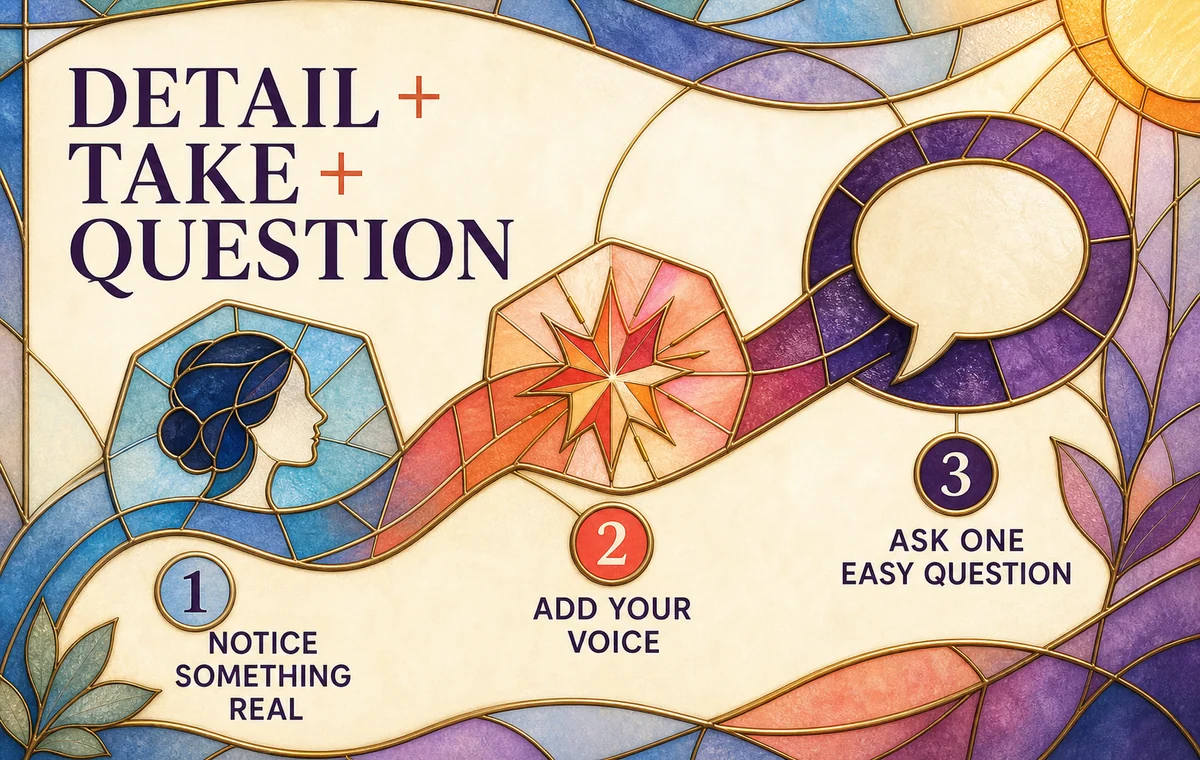
Treat every AI tip as raw material. Turn it into a message with three parts:
- Detail: Name the exact thing you noticed.
- Take: Add a short opinion, association, or playful reaction.
- Question: Give the other person one easy direction to answer.
Suppose the suggestion says, “Ask about their hiking photo.”
The generic version is:
“Where was that hike?”
The personalized version is:
“That ridge photo looks equal parts incredible and exhausting. Was the view worth the climb?”
The second message still uses the AI's direction, but it proves you looked, sounds like a person, and makes the response easier than an open-ended interview question.
How to Rewrite Common Convo Starter Suggestions
The useful move is not to make every message clever. It is to make it specific enough that the same line would not fit fifty other profiles.
| AI-style suggestion | Too generic | Better personal opener |
|---|---|---|
| Ask about the restaurant | “What's your favorite restaurant?” | “That tiny pasta place in photo three looks like a serious find. Is it worth crossing town for?” |
| Mention their dog | “Cute dog. What's its name?” | “Your dog has the exact expression of someone who approves every match. How strict is the screening process?” |
| Ask about travel | “Where do you want to travel next?” | “You look suspiciously calm on that cliff. Are you actually fearless, or was the camera hiding the panic?” |
| Talk about cooking | “What do you like to cook?” | “Homemade ramen is an ambitious profile flex. Is the broth genuinely an all-day project?” |
| Discuss their prompt answer | “Why did you choose that?” | “You ranked breakfast above dinner, which is bold. Are we talking pastries or a full eggs-and-coffee operation?” |
| Share a common interest | “I like live music too.” | “You picked the exact kind of small venue where the opening act steals the show. Best surprise set you've seen?” |
These examples work because they contain a visible reason for the message. They are also answerable without asking the match to produce a life story.
For more structures you can adapt, use our best Hinge openers guide. If you tend to overthink the next line after a reply, the Hinge conversation guide covers how to keep momentum without turning the chat into an interview.
When the AI Tip Is Weak
Sometimes the suggestion will be bland, inaccurate, or based on the least interesting detail. Hinge says the ideas are automatically generated and are not reviewed in advance, so treat a poor result as disposable.
Use this decision order:
- Keep the observation if it points to a real, useful detail.
- Discard the wording if it sounds generic or unlike you.
- Choose another profile element if the suggestion leads nowhere.
- Send no comment if you cannot find a sincere angle. A forced message is not automatically better than a clean like.
Do not argue with the AI, explain that the suggestion was bad, or tell the match that software wrote your opener. The feature should disappear into the process. The recipient should experience a relevant message, not your tool choice.
Build a Profile That Creates Better Conversation Hooks
Convo Starters also reveal something useful about your own profile. Other people may receive ideas based on the content you publish. If your profile offers only generic material, the possible conversation paths will be generic too.
Content that gives a person or an AI system something concrete to work with includes:
- an activity photo with a recognizable action or setting;
- a prompt answer containing a specific preference, ritual, opinion, or story;
- a travel photo with context beyond “I like travel”;
- a hobby shown in progress rather than listed as a label;
- a small, friendly disagreement someone can respond to;
- a photo caption that answers where or why without giving away the whole story.
Content that usually leaves less to work with includes repeated selfies, group photos with no clear subject, one-word prompt answers, broad claims such as “I love food,” and polished photos with no visible context.

Hinge's own documentation says Convo Starters may not appear on selfies or group photos. That is a feature limitation, not proof that those photo types are always bad. Still, it creates another reason to include clear activity and lifestyle images in your lineup.
If your prompts feel too broad, see our Hinge prompt examples for guys. If the problem is the photo lineup, start with how to get more matches on Hinge.
Keep the Message Human
A polished opener does not need to sound like ad copy. In fact, too much polish can make it feel generated.
Before sending, check four things:
- Would I say this out loud? Remove vocabulary or punctuation you never use.
- Is the detail visible? The match should instantly understand why you asked.
- Is there only one real question? Multiple questions create homework.
- Can they answer in one or two sentences? Low effort makes starting easier.
You can also shorten. “That restaurant looks great. What did you order?” is better than a long performance built around a simple photo.
Turn a Good Opener Into a Real Conversation
Wingman can help you shape a reply around the actual screenshot and context, so the next message sounds natural instead of copied from a template.
Privacy and Control
The feature is optional. Hinge says Convo Starters use photos, written prompt answers, and pronouns already shared on the public profile. It says this material is sent to OpenAI as a data processor, is not used by OpenAI to train models, and is deleted by OpenAI within 30 days. Hinge also says the feature does not process facial geometry, biometric data, or private messages.
Hinge retains generated Convo Starters with other account data for the life of the account, and the generated material can appear in a data download. You can turn Convo Starters off in settings; when disabled, ideas are no longer generated on your content and you will not see them on other profiles or new matches.
Read the current Hinge help page before opting in because availability and data handling can change. Also avoid placing private information in public prompts just to make them more “interesting.” Specific personality is useful; precise workplace, address, schedule, or contact information is not. Our dating app privacy checklist explains the boundary.
A 30-Second Convo Starter Checklist
Before you send:
- I used a detail from the actual profile.
- I added one thought that sounds like me.
- I asked one easy, relevant question.
- The message would not fit most other profiles.
- I removed any unnecessary explanation.
- I am comfortable sending it even if the AI tip disappears.
The feature can reduce blank-page anxiety. It cannot replace attention. The final advantage still comes from noticing something real and responding like a person.
FAQ
Does Hinge send Convo Starters automatically?
No. Hinge presents ideas, but you decide what to write and send. The feature does not send a first message on your behalf.
Why do I not see Convo Starters?
The feature may not be available in your region, one of you may have disabled it, or the selected content may be excluded. Hinge says suggestions may not appear on selfies, group photos, voice prompts, video prompts, polls, or sensitive content.
Should I copy a Hinge Convo Starter word for word?
Use it as direction, not final copy. Add a specific detail and a short personal reaction so the opener fits both the profile and your voice.
Do Convo Starters read private messages?
Hinge says the feature does not process private messages. It uses selected public profile information and can also show ideas in a new chat before the first message.
Can I turn Hinge Convo Starters off?
Yes. Hinge says you can opt out in settings. Turning it off stops ideas from being generated on your profile content and removes your access to suggestions on other profiles and matches.